
Introduction
Knowing how to calculate VAT in the UK is essential for pricing goods and services correctly, checking invoices, and preparing VAT returns. UK VAT calculations follow a standard method, but mistakes often happen when VAT-inclusive and VAT-exclusive prices are confused.
This guide explains UK VAT calculation step by step, using simple formulas and practical examples. Whether you are adding VAT to a price or calculating VAT from a VAT-inclusive amount, the same principles apply across the UK.
- Understanding UK VAT Prices
- UK VAT Calculation Formula (Standard Rate)
- How to Calculate VAT from a VAT-Inclusive Price
- Common 20% VAT Calculations in the UK
- UK VAT Calculation for Different Rates
- How to Calculate VAT After a Discount
- Common UK VAT Calculation Mistakes
- VAT Rounding Rules in the UK
- Calculate UK VAT
- External Reference
- VAT on an Invoice
- Frequently Asked Questions
- Key Takeaways
Understanding UK VAT Prices
Before calculating VAT, you need to know whether a price is:
- VAT exclusive (net price) – VAT not included
- VAT inclusive (gross price) – VAT already included
Using the wrong method leads to incorrect results.
UK VAT basics – Explained Briefly
UK VAT Calculation Formula (Standard Rate)
The standard UK VAT rate is 20%.
Formula to Add VAT
VAT amount = Net price × VAT rate
Gross price = Net price × (1 + VAT rate)
Example
- Net price: 100
- VAT (20%): 20
- Gross price: 120
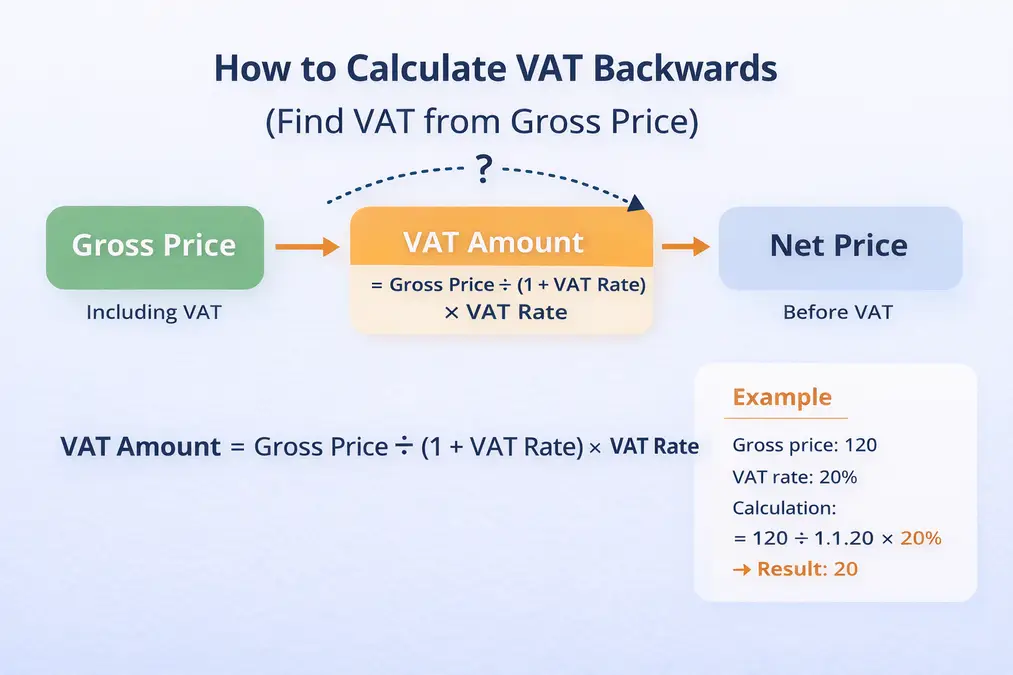
How to Calculate VAT from a VAT-Inclusive Price
When VAT is already included, you must divide, not subtract.
Reverse VAT Formula
Net price = Gross price ÷ 1.20
VAT amount = Gross price − Net price
Example
- Gross price: 120
- Net price: 100
- VAT amount: 20
Full explanation: remove VAT from price
Common 20% VAT Calculations in the UK
Below are common examples of 20% VAT calculations frequently searched in the UK:
| Net Price | VAT (20%) | Gross Price |
|---|---|---|
| £100 | £20 | £120 |
| £250 | £50 | £300 |
| £500 | £100 | £600 |
| £750 | £150 | £900 |
| £1,000 | £200 | £1,200 |
These examples show how VAT increases proportionally with price.
UK VAT Calculation for Different Rates
UK VAT rates affect the multiplier used:
- 20% (standard): divide or multiply by 1.20
- 5% (reduced): divide or multiply by 1.05
- 0% (zero): no VAT added
How to Calculate VAT After a Discount
When a discount is applied, VAT must be calculated on the discounted price – not the original price.
Example
Original price: £500
Discount: 10% (£50)
Discounted price: £450

VAT (20%) = £450 × 0.20 = £90
Final price = £540
VAT is always applied after discounts are deducted.
Common UK VAT Calculation Mistakes
- Subtracting VAT directly from the gross price
- Using the wrong VAT rate
- Confusing inclusive and exclusive prices
Avoid these errors: VAT calculation mistakes
VAT Rounding Rules in the UK
HMRC allows VAT amounts to be rounded to the nearest penny.
Standard practice:
- VAT can be rounded up or down to 2 decimal places.
- Invoice totals must be accurate to the nearest penny.
Incorrect rounding can cause small discrepancies in VAT returns.
Calculate UK VAT
Manual calculations can lead to errors.
Using a calculator ensures accuracy.
Internal calculator link:
UK VAT calculator for businesses
External Reference
HMRC – VAT rates and calculation guidance
VAT on an Invoice
A typical UK invoice includes:
Net amount: £1,000
VAT (20%): £200
Total payable: £1,200
Invoices must clearly show:
- VAT registration number
- VAT rate applied
- Charged VAT amount
Frequently Asked Questions
How do I calculate VAT in the UK?
Multiply the net price by the VAT rate and add it to the net price.
How do I remove VAT from a price?
Divide the VAT-inclusive price by 1.20 for standard rate VAT.
Is the VAT calculation the same for all UK businesses?
Yes. Only the VAT rate may change depending on the goods or services.
How do I calculate 20% VAT quickly?
Multiply the net amount by 0.20 or use a VAT calculator for instant results.
What is the formula for reverse VAT calculation?
Divide the VAT-inclusive price by 1.20 to find the net price.
Does VAT apply before or after discounts?
VAT is calculated after any discount is applied.
Key Takeaways
- UK VAT standard rate is 20%
- VAT is calculated from the net price
- Reverse VAT uses division, not subtraction
- VAT rates affect the multiplier used
- Calculators reduce errors