Introduction
Understanding the VAT calculation formula is essential if you want to price products correctly, read invoices accurately, or avoid tax calculation errors. Whether you are adding VAT to a net price or removing VAT from a VAT-inclusive amount, the formula must be applied correctly.
This guide explains the exact VAT formulas, when to use each one, and provides clear examples. Since VAT rates vary by country, the principles stay the same even though percentages differ.
Quick answer: Gross = Net × (1 + rate). Net = Gross ÷ (1 + rate). VAT = Net × rate. At 20% VAT the multiplier is 1.2.
Table of Contents
- The Basic VAT Calculation Formula
- Formula to Add VAT to a Price
- Formula to Remove VAT from a Price (Reverse VAT)
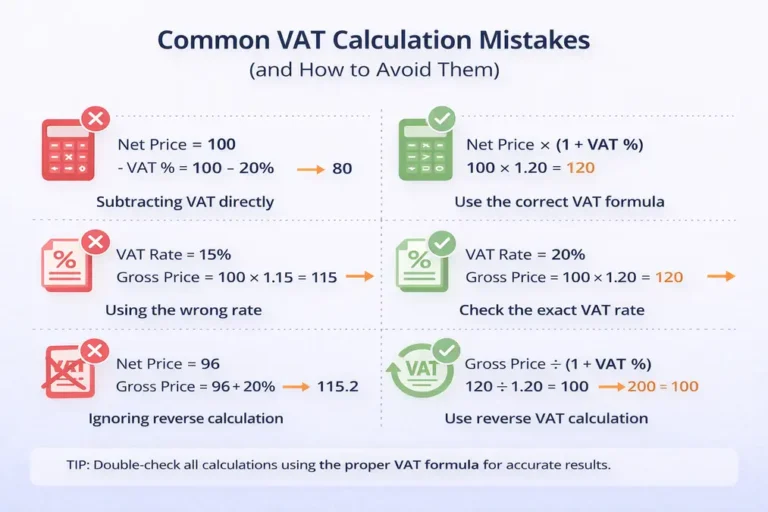
- Why You Cannot Subtract VAT Directly
- VAT Formula Using Percentages vs Decimals
- Does the VAT Formula Change by Country?
- External Reference
- Frequently Asked Questions
- Key Takeaways
The Basic VAT Calculation Formula
The core VAT formula is simple:
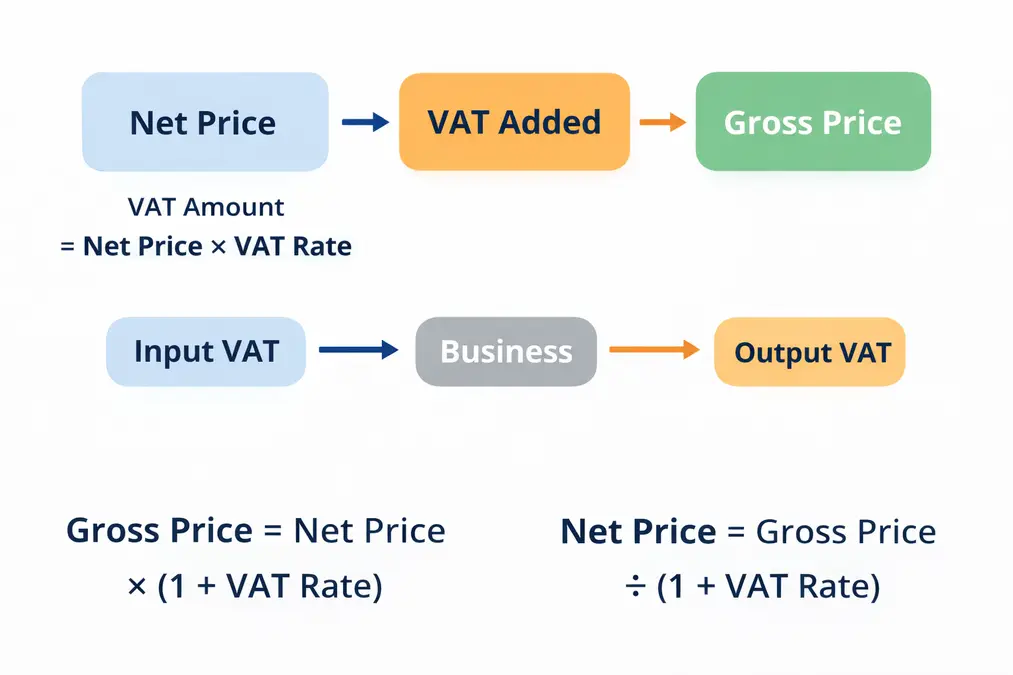
VAT amount = Net price × VAT rate
Once you know the VAT amount, you can calculate the final price.
Gross price = Net price + VAT amount
These formulas apply in every VAT system worldwide.
Formula to Add VAT to a Price
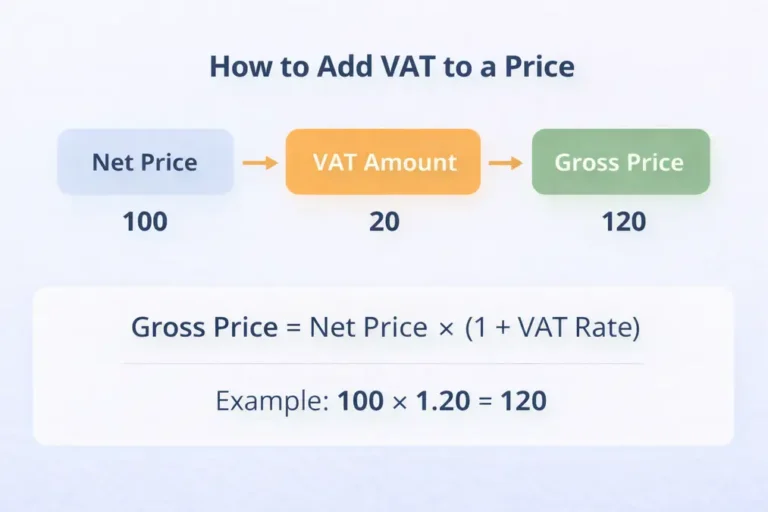
Use this formula when the price does not include VAT.
Gross price = Net price × (1 + VAT rate)
Example
- Net price: 100
- VAT rate: 20%
- Gross price: 100 × 1.20 = 120
Learn how VAT flows in real transactions
Formula to Remove VAT from a Price (Reverse VAT)
When the price already includes VAT, you must divide — not subtract.
Net price = Gross price ÷ (1 + VAT rate)
Example
- Gross price: 120
- VAT rate: 20%
- Net price: 120 ÷ 1.20 = 100
Detailed explanation here about ‘Net vs Gross VAT Price‘
Why You Cannot Subtract VAT Directly
A common mistake is subtracting VAT from a gross price.
This is incorrect because VAT is calculated as a percentage of the net price, not the gross price.
Using the correct formula ensures:
- Accurate totals
- Correct invoicing
- Compliance with tax rules
VAT Formula Using Percentages vs Decimals
You can calculate VAT using:
- Percentages: 20%
- Decimals: 0.20
Both work the same way.
Example:
VAT = 100 × 0.20 = 20
VAT Formulas at 5%, 10%, 15% and 20%
| VAT rate | Add VAT (net to gross) | Remove VAT (gross to net) | VAT included in a gross price |
|---|---|---|---|
| 5% | Net × 1.05 | Gross ÷ 1.05 | Gross − (Gross ÷ 1.05) |
| 10% | Net × 1.10 | Gross ÷ 1.10 | Gross − (Gross ÷ 1.10) |
| 15% | Net × 1.15 | Gross ÷ 1.15 | Gross − (Gross ÷ 1.15) |
| 20% | Net × 1.20 | Gross ÷ 1.20 | Gross − (Gross ÷ 1.20) |
VAT Formulas in Excel and Google Sheets
Put the price in cell A1 and the VAT rate in B1 (for example 20% or 0.2). These formulas work in both Excel and Google Sheets.
| What you want | Formula |
|---|---|
| Add VAT to a net price | =A1*(1+B1) |
| VAT amount on a net price | =A1*B1 |
| Remove VAT from a gross price | =A1/(1+B1) |
| VAT included in a gross price | =A1-A1/(1+B1) |
| Add 20% VAT with no rate cell | =A1*1.2 |
Use =ROUND(A1*(1+B1),2) when you need to round to two decimals. For worked steps see how to calculate VAT step by step, and for UK rounding see UK VAT rounding rules.
Does the VAT Formula Change by Country?
The formula stays the same, but:
- VAT rates differ
- Some items may be exempt or zero-rated
Always apply the correct VAT rate for your country.
Related guides: how to calculate VAT step by step, how to remove VAT from a price and net vs gross price.
External Reference
For internationally accepted VAT calculation principles, see:
OECD – International VAT/GST Guidelines
Frequently Asked Questions
What is the basic VAT calculation formula?
VAT amount = Net price × VAT rate.
How do I remove VAT from a price?
Divide the gross price by (1 + VAT rate).
Is the VAT formula the same worldwide?
Yes. Only the VAT rate changes by country.
Key Takeaways
- VAT is calculated from the net price
- Adding VAT uses multiplication
- Removing VAT uses division
- Subtracting VAT directly is incorrect
- Country rules affect rates, not formulas